

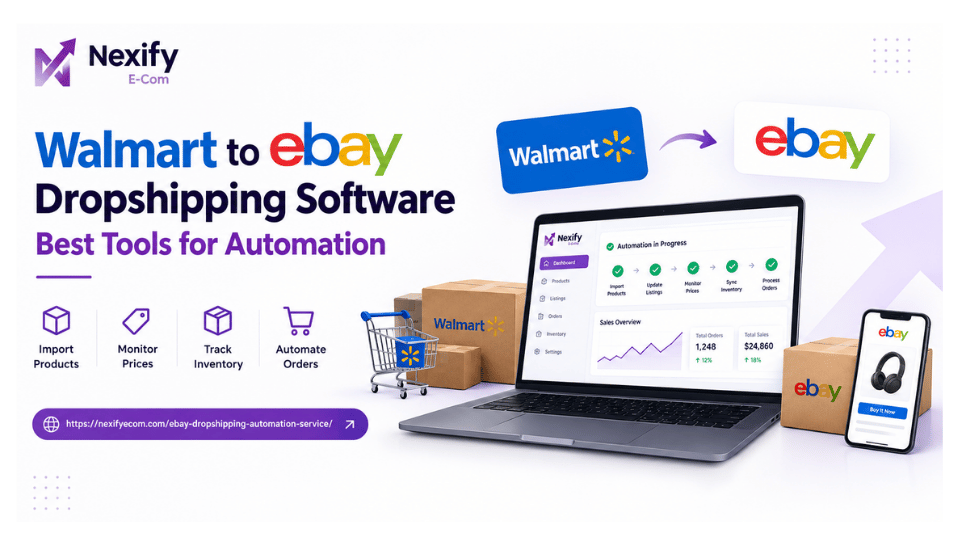
Walmart to eBay Dropshipping Software: Best Tools for Automation
Walmart to eBay dropshipping software helps sellers import Walmart products to eBay, monitor supplier prices and inventory, update listings, and automate parts of the order fulfillment process. For sellers looking to reduce manual work, tools such as AutoDS, DSM Tool, Hustle Got Real, and Inventory Source can help with different parts of the dropshipping workflow.
For a direct Walmart-to-eBay workflow, AutoDS is one of the most relevant options to evaluate because its current Walmart integration supports product importing, price and stock monitoring, listing optimization, and order automation.
What Is Walmart to eBay Dropshipping Software?
Walmart to eBay dropshipping software is a platform or tool that connects your product sourcing workflow with your eBay store.
Instead of manually copying Walmart product information, creating eBay listings, checking inventory, monitoring price changes, and processing every order, automation software can handle many of these repetitive tasks.
A typical Walmart to eBay dropshipping tool can help with:
- Importing Walmart products to eBay
- Creating and editing eBay listings
- Monitoring Walmart product prices
- Tracking supplier inventory
- Updating eBay listings when prices or stock change
- Managing product variations
- Processing or assisting with orders
- Updating tracking information
- Applying pricing and profit-margin rules
The exact features depend on the software, plan, supplier, and eBay integration method.
How Does Walmart to eBay Dropshipping Work?
The basic workflow is:
Walmart product → Product research → Software → eBay listing → Customer order → Walmart fulfillment → Tracking update
You first identify products on Walmart that have suitable demand, pricing, availability, and profit potential. The product can then be imported into your eBay store through a compatible automation platform.
Once the product is listed, the software can monitor supplier information. If the Walmart price or stock changes, supported software can update the corresponding eBay listing.
For example:
Walmart cost: $25
eBay selling price: $39.99
Your actual profit cannot simply be calculated as $39.99 − $25. You also need to account for marketplace fees, shipping, returns, software costs, taxes where applicable, and other operating expenses.
This is why pricing and inventory automation are important parts of the workflow.
What Can Walmart to eBay Automation Do?
The main purpose of Walmart to eBay automation is to reduce repetitive store-management tasks.
1. Import Walmart Products to eBay
One of the biggest time-saving features is product importing.
Instead of manually copying product information from Walmart, a compatible tool can pull information such as:
- Product title
- Product description
- Images
- Specifications
- Variations
- Supplier price
- Product URL
AutoDS currently allows Walmart products to be imported into eBay drafts, where sellers can edit titles, descriptions, images, variations, and pricing before publishing. It also supports regular, bulk, and scheduled imports.
This makes import Walmart products to eBay much faster than building every listing manually.
2. Walmart eBay Inventory Sync
Inventory synchronization is another important feature.
If a Walmart product becomes unavailable after you have listed it on eBay, continuing to sell that product can create fulfillment problems.
A Walmart eBay inventory sync system monitors supplier availability and can update your eBay listing when stock changes.
AutoDS states that its Walmart integration monitors supplier stock and can synchronize stock changes with the eBay store.
This can help reduce:
- Out-of-stock sales
- Manual stock checks
- Order cancellations
- Incorrect availability information
3. Price Monitoring
Supplier prices can change frequently.
Suppose you list a Walmart product on eBay for $45 while its Walmart price is $28. If Walmart later increases the price to $36, your original pricing may no longer provide the margin you expected.
Price monitoring software can detect supplier price changes and update your eBay listing according to your configured rules.
AutoDS currently states that its Walmart-to-eBay system checks supplier price and stock changes and synchronizes relevant changes to eBay.
4. Dynamic Pricing
Some automation platforms go beyond simple price synchronization.
They can apply pricing rules based on:
- Supplier cost
- Desired profit margin
- Minimum profit
- Shipping cost
- Product performance
- Competitive pricing
This gives sellers more control over their pricing strategy instead of manually changing every listing.
5. Order Automation
Order management can become difficult as the number of sales increases.
A typical automated workflow looks like:
eBay order received
↓
Product and order information synced
↓
Order fulfilled through supplier workflow
↓
Product shipped to customer
↓
Tracking information updated
AutoDS currently offers automatic ordering and a Fulfilled by AutoDS service for supported workflows.
However, sellers should always check exactly which fulfillment method is available for their account, supplier, location, and plan.
Best Walmart to eBay Dropshipping Software
There is no single software that is best for every seller.
The right choice depends on whether your priority is product importing, inventory synchronization, pricing automation, order fulfillment, product research, or multi-channel selling.
1. AutoDS
Best for: Direct Walmart-to-eBay automation
AutoDS is one of the strongest matches for the specific Walmart to eBay dropshipping software search intent.
Its current Walmart-to-eBay integration supports product importing, listing optimization, price and stock monitoring, product variations, shipping-price calculations, and automated order fulfillment options.
Key features
- Walmart product importing
- eBay integration
- Bulk product importing
- Scheduled imports
- Price monitoring
- Stock monitoring
- Product variation support
- Pricing optimization
- Automatic order options
- Tracking-related automation
- Product research tools
AutoDS also states that its monitoring scans supplier price and stock changes hourly for its eBay automation workflows.
Best for: Sellers who want one platform covering most of the Walmart-to-eBay workflow.
2. DSM Tool
Best for: eBay-focused dropshipping management
DSM Tool is designed around eBay dropshipping and store management.
It can be useful for sellers who want tools for listing management, supplier monitoring, pricing, inventory, and order processing.
Before choosing it specifically for Walmart sourcing, verify the current Walmart supplier integration and which features are available under your selected plan.
Best for: Sellers who want an eBay-focused dropshipping platform with broader supplier options.
3. Hustle Got Real
Best for: Multi-channel dropshipping
Hustle Got Real focuses on product sourcing, listing, stock monitoring, price monitoring, and order workflows across supported marketplaces and suppliers.
It can be worth considering if you plan to expand beyond a single Walmart-to-eBay workflow.
Best for: Sellers who want broader multi-channel dropshipping capabilities.
4. Inventory Source
Best for: Inventory and supplier-data synchronization
Inventory Source takes a more inventory-focused approach.
Its tools are designed around supplier feeds, product data, inventory synchronization, product uploads, and marketplace integrations.
This can make it more suitable for sellers whose main concern is keeping supplier inventory and product information synchronized across sales channels.
Best for: Businesses that need supplier-feed and inventory-management functionality.
Walmart to eBay Dropshipping Software Comparison
| Software | Walmart Workflow | eBay | Product Import | Price & Stock Monitoring | Order Automation |
|---|---|---|---|---|---|
| AutoDS | Strong direct match | Yes | Yes | Yes | Yes |
| DSM Tool | Verify current support | Yes | Yes | Yes | Yes |
| Hustle Got Real | Supported suppliers vary | Yes | Yes | Yes | Available depending on workflow |
| Inventory Source | Supplier-dependent | Yes | Yes | Yes | Available depending on integration |
Note: Features can vary by subscription, supplier, marketplace, region, and integration method. Always check the provider’s current documentation before choosing a paid plan.
How to Choose a Walmart to eBay Dropshipping Tool
Don’t choose software simply because it advertises “automation.”
Look at the specific functions you actually need.
Product Importing
If you plan to list many Walmart products, look for:
- One-click importing
- Bulk importing
- Product URL importing
- Scheduled imports
- Image importing
- Variation support
- Listing templates
- Title and description editing
Bulk importing becomes especially useful when scaling your product catalog.
Inventory Synchronization
Your software should be able to monitor supplier availability and reflect relevant changes on eBay.
Look for:
- Stock monitoring
- Automatic out-of-stock handling
- Quantity controls
- Minimum stock settings
- Inventory alerts
This is one of the most important features when you automate Walmart to eBay dropshipping.
Price Synchronization
Look for software that can monitor supplier pricing and apply your own pricing rules.
Useful controls may include:
- Minimum profit margin
- Maximum price
- Markup percentage
- Fixed profit
- Break-even pricing
- Shipping-cost calculation
Order Management
If you want more than listing automation, check whether the platform supports:
- Order syncing
- Automatic purchasing
- Fulfillment management
- Tracking updates
- Order status synchronization
“Don’t assume that eBay dropshipping automation means every part of fulfillment is completely automatic.”
eBay Integration
The quality of the eBay integration matters.
Check whether the software supports your preferred connection method and whether features such as inventory, pricing, orders, and tracking can be synchronized automatically.
Scalability
If you eventually plan to manage hundreds or thousands of listings, check:
- Bulk listing capabilities
- Number of supported stores
- Product limits
- Monitoring limits
- Automation limits
- Pricing at higher volumes
A tool that works for 20 listings may not be the best option for 2,000.
Manual vs Automated Walmart to eBay Dropshipping
| Task | Manual | Automated |
|---|---|---|
| Find products | Manual research | Research tools available |
| Create listings | Copy/paste | Product importer |
| Update prices | Manual | Price monitoring |
| Check stock | Manual | Inventory monitoring |
| Update listings | Manual | Automatic synchronization |
| Process orders | Manual | Automated/assisted |
| Update tracking | Manual | Automated where supported |
| Scale listings | Time-consuming | Bulk tools |
Automation doesn’t remove the need to manage your business. It simply reduces repetitive operational work.
You still need to make decisions about products, pricing, customer service, returns, store performance, and profitability.
How to Automate Walmart to eBay Dropshipping
A practical setup can follow these steps.
Step 1: Set Up Your eBay Store
Create your seller account and configure your basic:
- Payment settings
- Shipping policies
- Return policies
- Listing preferences
- Seller information
Step 2: Choose Your Automation Software
Compare software based on:
- Walmart compatibility
- eBay integration
- Product importing
- Inventory synchronization
- Price monitoring
- Order automation
- Monthly cost
For a direct Walmart-to-eBay workflow, AutoDS is a strong starting point to evaluate because its current documentation specifically covers this integration.
Step 3: Connect Your eBay Store
Connect your eBay store using the integration method supported by your selected platform.
Step 4: Research Products
Don’t import products simply because they are cheap on Walmart.
Look for products with:
- Existing demand
- Reasonable competition
- Stable supplier availability
- Sufficient profit potential
- Practical shipping
- Good customer reviews
Step 5: Import Walmart Products
Use your selected software to create product drafts or listings.
Review the imported information before publishing.
Pay attention to:
- Title
- Description
- Images
- Variations
- Product specifications
- Selling price
- Shipping
- Returns
Step 6: Set Pricing Rules
Calculate your expected costs before setting your eBay price.
A simple formula is:
Selling Price − Product Cost − eBay Fees − Shipping − Other Costs = Estimated Profit
Your target margin should be realistic rather than based only on the difference between Walmart and eBay prices.
Step 7: Enable Inventory Monitoring
Configure stock monitoring so supplier changes can be reflected in your eBay listings.
Step 8: Monitor Orders
Once sales start coming in, review your order and fulfillment workflow regularly.
Automation should make operations easier, but you should still monitor orders and customer issues.
Benefits of Walmart to eBay Dropshipping Automation
Saves Time
Instead of manually checking every listing, automation can monitor product data and supplier changes for you.
Makes Scaling Easier
Bulk product importing and automated monitoring make it easier to manage a larger catalog.
Reduces Manual Errors
Automated price and stock synchronization can reduce mistakes caused by outdated supplier information.
Improves Operational Efficiency
Having product sourcing, listings, monitoring, and orders managed through one system can make the workflow easier to control.
Helps Manage More Listings
Manual monitoring becomes increasingly difficult as your catalog grows. Automation allows sellers to spend more time on product research, optimization, customer service, and store growth.
Important Risks to Consider
Automation is not the same as guaranteed profit.
Before using any Walmart to eBay dropshipping software, consider the following.
Supplier Price Changes
A product that looks profitable today may become less profitable after a supplier price increase.
Inventory Changes
A popular Walmart product can become unavailable, so inventory monitoring is important.
eBay Fees
Always calculate your profit after applicable marketplace fees.
Returns
You remain responsible for managing the customer experience on your eBay store.
Product Quality
Automated listing does not guarantee that every product is suitable for your customers.
Policy Compliance
Both the marketplace and supplier have policies that can affect your business model. Review current eBay requirements and Walmart’s current terms before operating at scale.
Automation Errors
No software should be treated as completely hands-off. Regularly review listings, orders, pricing, inventory, and account performance.
Common Mistakes When Using Walmart to eBay Software
Importing Too Many Products
More listings don’t automatically mean more sales.
Start with products that have a reasonable demand and margin potential.
Ignoring Product Variations
Size, color, quantity, and other variations can affect pricing and availability.
Using Old Prices
Supplier prices can change, so static pricing can create unexpected margin problems.
Ignoring Shipping Costs
A product may appear profitable until shipping is included.
Not Checking Listings
Imported content should be reviewed before publishing.
Relying Completely on Automation
Automation should support your business—not replace decision-making.
Is Walmart to eBay Dropshipping Software Worth It?
For sellers managing multiple listings, automation can be valuable because it reduces repetitive tasks such as product importing, inventory checking, price monitoring, and order management.
The biggest benefit isn’t simply “making everything automatic.”
The real benefit is creating a repeatable workflow that lets you manage more products without manually updating every listing.
If you’re only managing a handful of products, manual management may still be manageable. As your catalog grows, however, Walmart to eBay automation can become much more useful.
Frequently Asked Questions
What is the best Walmart to eBay dropshipping software?
For a direct Walmart-to-eBay workflow, AutoDS is one of the strongest options to evaluate because it specifically supports Walmart product importing, eBay listings, price and stock monitoring, and automated order workflows.
Can I import Walmart products to eBay?
Yes. Compatible tools can import Walmart product information into eBay listings or drafts. AutoDS currently supports Walmart product importing, including regular and bulk import options.
Can Walmart inventory sync with eBay?
Yes. Compatible automation software can monitor Walmart inventory and synchronize relevant stock changes with eBay. AutoDS specifically provides Walmart price and stock monitoring for its eBay workflow.
Can you automate Walmart to eBay dropshipping?
Yes, parts of the workflow can be automated, including product importing, price monitoring, stock monitoring, listing updates, and order fulfillment depending on the software and integration.
Is Walmart to eBay dropshipping profitable?
It can be, but profitability depends on product selection, selling price, marketplace fees, supplier costs, shipping, returns, and other expenses. Software can improve operational efficiency, but it does not guarantee profit.
Do I need software for Walmart to eBay dropshipping?
No. You can manage listings manually, but software becomes increasingly useful as the number of products and orders grows.
What should I look for in Walmart eBay dropshipping software?
Prioritize:
- Walmart supplier support
- eBay integration
- Product importing
- Price monitoring
- Inventory synchronization
- Order management
- Tracking updates
- Bulk listing
- Pricing rules
- Scalability
Final Takeaway
Walmart to eBay dropshipping software is designed to simplify the connection between a Walmart product source and an eBay store.
The most useful capabilities are product importing, Walmart eBay inventory sync, price monitoring, listing management, and order automation.
For sellers specifically looking to automate the Walmart-to-eBay workflow, AutoDS is one of the most direct options to evaluate, while other platforms may be better suited to eBay-focused management, multi-channel selling, or supplier-feed synchronization.
The goal should not be to automate every decision. Instead, use automation to handle repetitive operations while you focus on product selection, profitability, customer experience, and sustainable store growth.